
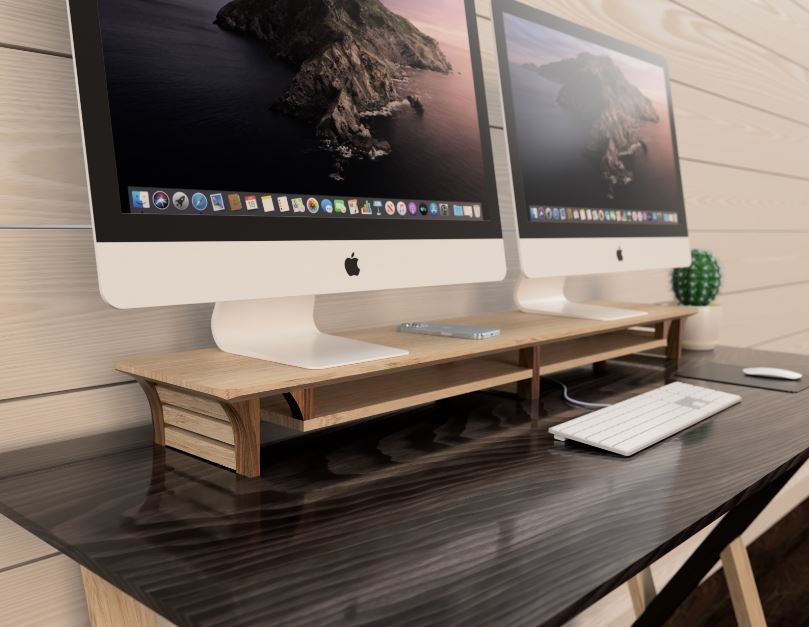
A well-organized workstation can make everyday office tasks easier, especially for professionals who work with multiple applications, documents, and digital tools. Businesses and remote employees increasingly use two monitors to manage their workloads, improve multitasking, and maintain an organized working environment. Choosing the right Dual Monitor Desk Philippines solution is therefore important for creating a comfortable, functional, and professional workspace.
A dual monitor setup requires more than simply placing two screens on an ordinary computer table. The desk should provide sufficient surface area, reliable support, effective cable management, and enough room for essential office accessories. Whether you are furnishing a corporate office in Manila, setting up a startup in Quezon City, or improving your home office, selecting suitable office furniture can make a noticeable difference in your daily working experience.
Why Choose a Dual Monitor Desk for Your Office?
Working with two monitors allows professionals to handle multiple tasks without constantly switching between windows. Employees can review documents on one screen while preparing reports on another. Designers can compare creative projects, accountants can manage spreadsheets, and customer support representatives can monitor different applications simultaneously.
However, these benefits depend on having a suitable desk. A properly designed dual monitor workstation provides enough room for both screens while keeping the keyboard, mouse, documents, and other accessories within easy reach.
Businesses should consider desk dimensions, material quality, stability, and storage requirements before purchasing. A practical desk can also help maintain a clean office appearance and make better use of available floor space.
For companies planning a complete workspace upgrade, combining dual monitor desks with office workstation installation, office furniture customization, and workspace planning services can help create a consistent office environment.
Important Features of a Quality Dual Monitor Desk Philippines
Not every computer desk is suitable for supporting two monitors. Before choosing a model, consider the following features to ensure that the workstation meets your professional requirements.
Spacious Desktop Surface
A wide desktop is one of the most important features of a dual monitor workstation. Both monitors should fit comfortably without making the workspace feel crowded. You should also have sufficient room for a keyboard, mouse, speakers, notebooks, and other daily essentials.
Consider the size of your monitors and whether you intend to use monitor stands or adjustable monitor arms. A deeper desktop can provide additional flexibility by allowing screens to be positioned at a comfortable viewing distance.
Strong and Stable Construction
Two Dual Monitor Desk Philippines and their accessories add weight to a desk. Therefore, stability should be a priority when selecting office furniture.
Look for desks made with durable materials, properly supported legs, and reliable construction. A sturdy metal frame combined with a quality desktop can provide dependable support for everyday office activities.
Businesses purchasing several workstations should also consider long-term durability and maintenance requirements. Choosing suitable materials can help reduce the need for frequent replacements.
Effective Cable Management
Multiple monitors usually involve several power and display cables. Without proper organization, these cables can create clutter underneath and across the desk.
Cable management features such as grommet holes, cable trays, and wire organizers help maintain a cleaner workspace. They also make it easier to connect additional equipment when required.
For offices with multiple employees, office workstation customization can include practical cable management solutions that keep individual work areas organized.
Storage and Organization
A good workstation should accommodate more than computer equipment. Employees may need space for documents, stationery, office supplies, and personal belongings.
Desks with drawers, side cabinets, and mobile storage units provide convenient organization without taking up unnecessary floor space.
You can also combine your workstation with filing cabinet installation, mobile pedestal supply, and office storage cabinet solutions to create a more organized working environment.
How to Select the Right Dual Monitor Desk for Different Work Environments
Different workplaces have different furniture requirements. A desk that works well for a home office may not be the most practical choice for a corporate department or a professional design studio.
Corporate Offices in Manila
Corporate offices often require workstations that support multiple employees while maintaining a consistent interior design. Dual monitor desks can help employees manage administrative work, communication platforms, financial records, and business applications.
Companies should evaluate the available floor area, number of employees, equipment requirements, and storage needs before selecting desks.
For larger office projects, corporate office furniture supply and office layout planning services can help businesses choose suitable furniture for individual departments.
Startups and Small Businesses in Quezon City
Startups frequently operate in offices where space and budget must be managed carefully. A dual monitor desk can provide a practical working area without requiring a separate table for every piece of equipment.
Compact desk designs, integrated storage, and shared workstation arrangements can help businesses use their available space efficiently.
Startups can also consider office furniture consultation, custom office table manufacturing, and office space optimization services when planning a new workspace.
Home Offices and Remote Workspaces
Remote employees need furniture that supports regular computer use while fitting naturally into residential interiors.
A dual monitor desk should provide enough working space without overwhelming the room. Minimalist designs, compact storage, and neutral finishes can help create a professional home office.
Pairing the desk with an ergonomic chair and appropriate lighting can make the workstation more practical for everyday use.
Creative Studios and Professional Workspaces
Graphic designers, video editors, architects, engineers, and other creative professionals often depend on multiple displays.
These users may need additional space for drawing tablets, reference materials, speakers, and other equipment. A wider desk with strong construction can accommodate these requirements more comfortably.
For specialized environments, custom workstation design services can help businesses select dimensions and configurations that match their equipment and workflow.
Different Types of Dual Monitor Desks to Consider
Understanding available desk styles can make the purchasing process easier. Each design offers different advantages depending on the office layout and the user’s working habits.
Straight Computer Desks
Straight desks are a practical option for employees who need a simple and spacious working surface. They can accommodate two monitors when the dimensions and weight capacity are suitable.
Their straightforward design also makes them easy to arrange in individual offices, shared workspaces, and home offices.
L-Shaped Office Desks
L-shaped desks provide additional working space by extending the desktop along two sides. This configuration can separate computer equipment from paperwork and other office activities.
Professionals who regularly use two monitors, printers, documents, and additional accessories may find this design useful.
Height-Adjustable Desks
Height-adjustable desks allow users to change the working height according to their preferences and workstation requirements.
Some models use manual adjustment, while others feature electric mechanisms. When considering this option, check the frame’s weight capacity and whether it supports the combined weight of both monitors and other equipment.
Executive Office Desks
Executive desks combine professional appearance with functional working space. They often include larger desktops, storage compartments, and coordinated finishes.
For managers and business owners, an executive desk can provide a suitable environment for computer work, meetings, and administrative responsibilities.
Businesses can also explore executive office furniture supply and custom executive table design when furnishing management offices.
Choosing the Best Desk Material for Long-Term Use
Material selection affects the appearance, durability, maintenance, and overall performance of a desk.
Engineered wood is commonly used in office furniture because it offers different finishes and design possibilities. Laminated surfaces are another practical option because they are available in various colors and can be relatively easy to clean.
Solid wood desks provide a distinctive natural appearance, while metal frames can improve structural support and complement contemporary office interiors.
Before making a decision, evaluate the following factors:
- Durability: Choose materials suitable for regular office use.
- Surface finish: Consider finishes that are easy to maintain.
- Frame construction: Check the strength and stability of the supporting structure.
- Weight capacity: Ensure the desk can support both monitors and accessories.
- Maintenance: Select materials that suit your cleaning and maintenance routine.
- Office appearance: Match the furniture finish with your existing interior design.
The right combination of materials can help businesses maintain a professional workspace while managing long-term furniture costs.
Essential Office Furniture to Complete Your Dual Monitor Workstation
A dual monitor desk is only one part of a functional office. Supporting furniture and accessories can improve organization, comfort, and workspace efficiency.
Ergonomic Office Chairs
Employees who spend several hours working at computers need suitable seating. Ergonomic office chair supply is an important consideration when furnishing a workstation.
Look for chairs with adjustable seat height, appropriate back support, and comfortable seating materials. A suitable chair should allow users to maintain a comfortable posture while working.
Filing Cabinets and Storage Cabinets
Documents, contracts, stationery, and office supplies require organized storage. Filing cabinet solutions help employees arrange paperwork, while office storage cabinet installation provides additional space for shared office materials.
These storage options are particularly useful in administrative departments, schools, hospitals, and corporate offices.
Office Partitions and Workstation Dividers
Open-plan offices may require separate work areas for different employees. Office partition installation and office cubicle customization can help define individual workspaces while maintaining an organized office layout.
Partitions can also provide additional privacy for employees who regularly handle confidential documents or customer information.
Meeting Tables and Conference Furniture
Businesses also need dedicated spaces for discussions, presentations, and team collaboration. Conference table supply and meeting room furniture installation can help create professional meeting environments.
Selecting appropriate table dimensions and seating arrangements ensures that meeting rooms remain practical and comfortable.
Reception and Waiting Area Furniture
The reception area creates the first impression for visitors and clients. Reception desk customization, visitor chair supply, and office sofa installation can help businesses maintain a welcoming and professional entrance.
Coordinating these furniture elements with the main office interior can create a consistent appearance throughout the workplace.
Common Mistakes to Avoid When Buying a Dual Monitor Desk
Choosing a desk without evaluating its actual requirements can create unnecessary problems. Businesses should avoid several common purchasing mistakes.
Ignoring desktop dimensions: A desk may look spacious in product photographs but provide insufficient room for two monitors. Always check the actual measurements before purchasing.
Overlooking weight capacity: Two monitors, monitor arms, and other accessories can add considerable weight. Confirm that the desk construction can support the complete setup.
Forgetting cable organization: Poor cable management can make even an expensive workstation look untidy. Consider desks with suitable wire management features.
Choosing appearance over functionality: Attractive finishes are important, but the desk must also support daily working requirements.
Ignoring employee comfort: Desk height, chair compatibility, monitor positioning, and available legroom should all be considered.
Not planning storage: Without suitable storage, documents and accessories may occupy valuable desktop space. Consider combining desks with drawers, pedestals, and filing cabinets.
Avoiding these mistakes can help businesses make more informed furniture purchasing decisions.
How to Maintain Your Dual Monitor Desk
Regular maintenance helps preserve the appearance and functionality of office furniture. Simple cleaning practices can reduce surface damage and keep the workstation organized.
Use a soft microfiber cloth to remove dust from the desktop. Clean spills promptly and avoid leaving standing moisture on wooden or laminated surfaces. Follow the manufacturer’s cleaning recommendations when using cleaning products.
Check screws, brackets, legs, and other fittings periodically to ensure that the desk remains stable. Avoid placing excessive weight on unsupported sections of the desktop.
Keep cables organized and prevent them from becoming tangled around desk legs or moving components. If the desk includes adjustable features, follow the manufacturer’s instructions for proper operation.
Businesses managing multiple workstations can benefit from office furniture maintenance services and commercial furniture repair services to keep their office environments in good condition.
Why Businesses Should Plan Their Office Furniture Before Purchasing
Office furniture purchasing should begin with a clear understanding of the workplace rather than selecting individual products without a complete plan.
Businesses should measure available floor space, identify employee requirements, evaluate equipment dimensions, and establish a realistic furniture budget.
For larger projects, creating a furniture layout can help determine where desks, chairs, cabinets, partitions, and meeting tables should be positioned.
Professional office furniture consultation services can also help companies compare different furniture configurations and identify practical solutions for their requirements.
For businesses in Manila and Quezon City, considering delivery arrangements, installation requirements, customization options, and after-sales support is equally important.
A properly planned office can make better use of available space while creating a consistent environment for employees, managers, and visitors.
Frequently Asked Questions About Dual Monitor Desks in the Philippines
What size desk is suitable for two monitors?
The ideal size depends on monitor dimensions, stand designs, and additional equipment. A wider and deeper desktop generally provides more flexibility for arranging two screens and other accessories.
Can I use an L-shaped desk for two monitors?
Yes. An L-shaped desk can accommodate two monitors while providing additional space for documents, office equipment, and other work activities.
Is a standing desk suitable for a dual monitor setup?
Yes. A height-adjustable desk can support a dual monitor setup if its frame and desktop have sufficient weight capacity and dimensions.
What features should I look for in a dual monitor desk?
Look for a spacious desktop, stable construction, cable management features, sufficient weight capacity, and suitable storage options.
Which office chair is suitable for a dual monitor workstation?
An ergonomic office chair with adjustable height, comfortable seating, and appropriate back support is a practical choice for employees who spend extended periods working at computers.
Can dual monitor desks be customized for corporate offices?
Yes. Depending on the furniture supplier’s capabilities, desks can be customized according to dimensions, materials, finishes, storage requirements, and office layout.
What additional furniture should I purchase with a dual monitor desk?
Consider ergonomic office chairs, filing cabinets, mobile pedestals, storage cabinets, office partitions, and suitable lighting to complete the workstation.
Are dual monitor desks suitable for small offices?
Yes. Compact straight desks and carefully planned L-shaped workstations can accommodate two monitors while making efficient use of available space.
Create a More Functional Workspace with the Right Office Furniture
A well-designed dual monitor workstation supports everyday productivity, improves equipment organization, and helps businesses create a professional working environment. From selecting the right desktop dimensions to choosing durable materials and suitable storage, every detail contributes to a more practical office.
Businesses should consider their available space, employee requirements, equipment dimensions, and future expansion plans before investing in new workstations. Combining suitable desks with ergonomic chairs, storage cabinets, office partitions, and meeting room furniture can create a complete and coordinated workspace.
Whether you are furnishing a startup, upgrading a corporate office, or planning a professional home workstation, choosing furniture that meets your actual requirements is a worthwhile investment. Cebu Office Furniture Den can be included in your office furniture planning when exploring solutions for organized, functional, and professional work environments.
